
FICO369 | FinanceSuite
FICO369 | FinanceSuite for business calculations with saved history
Margin. Break-even. Reorder point. VAT. Calculate, add a note, save, reopen later or export PDF/Excel. FICO369 is for financial calculations you may need again — not one-off scratch math.
24 calculatorsSQLite historyPDF/ExcelHardware license
Why this software exists
Business math loses value when the calculation cannot be found again
A calculation has little business value if nobody can reopen it with context. Scattered workbooks keep the number and lose the note, the date and the reason. FICO369 FinanceSuite packs 24 calculators in four sections with SQLite history, notes, search/filters, reopen saved runs, PDF/Excel export, five languages, ten currencies and backup/restore/reset with hardware ID license.Typical control gaps
- Calculations are scattered across Excel files and paper.
- No central record of what was calculated and for whom.
- Old scenarios cannot be reopened with original inputs.
- Notes and business context disappear after the meeting.
- Export format varies depending on who prepared the file.
Typical users
Who needs repeatable financial calculations with history attached
Roles that calculate often and need history — not users looking for cosmetic dashboards.Business ownersCommercial teamsFinance / controllingOperationsProcurement
Business owners
Need fast, defensible calculations with history for recurring decisions.Commercial and sales teams
Run margin, markup and pricing scenarios with saved notes per customer.Finance and controlling
Use KPI, ratio and depreciation calculators with export for documentation.Operations and procurement
Apply reorder point, safety stock and inventory turnover calculators.Team leads
Reopen saved calculations instead of rebuilding from memory.Typical workflow
Choose calculator → compute → note → save → export
Calculate, save with context, find later — export and backup without cloud.Choose calculator (24 in 4 sections)↓Enter inputs & calculate↓Add note / description↓Save to SQLite history↓Search / filter / reopen↓Export PDF or Excel↓Backup / restore
Daily use
A calculation day that ends with a saved result, not a lost workbook tab
Each calculator supports Calculate, Save, Export PDF and Export Excel. History tab searches by note text, calculator type and date; advanced modes on selected calculators add depth without chart clutter in v1.Business results
What improves when every important calculation keeps notes and history
Repeatable accuracy
24 calculators share consistent input/output patterns across four sections.Searchable history
Notes, filters and reopen replace folder archaeology.Standard export
PDF and Excel from calculator or history view.Local control
Backup, restore, reset and hardware-locked license without internet.Product screens
Screens from calculators, notes, history and export
Calculator and history views; v1 focuses on accuracy and export — charts not included.

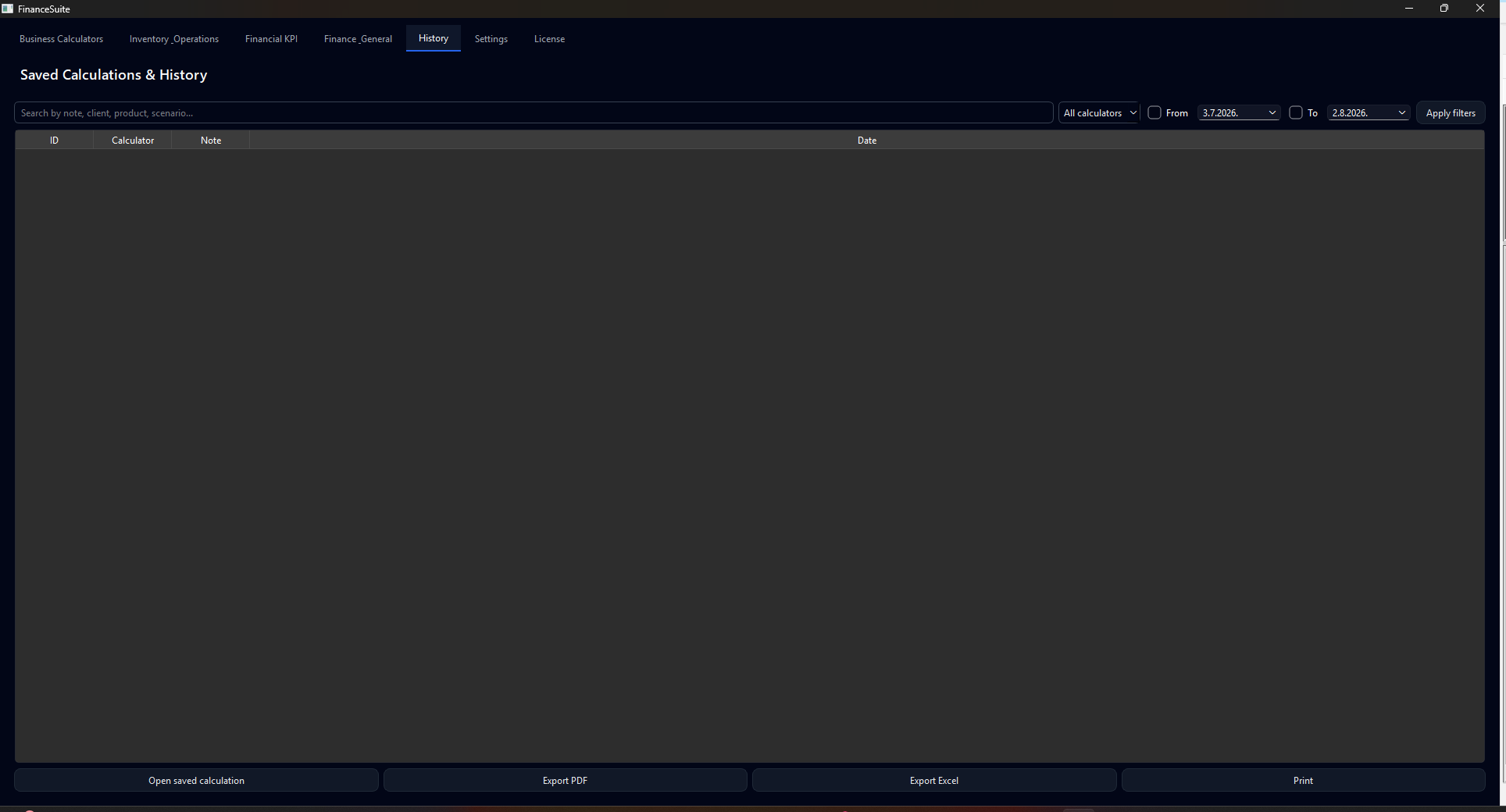
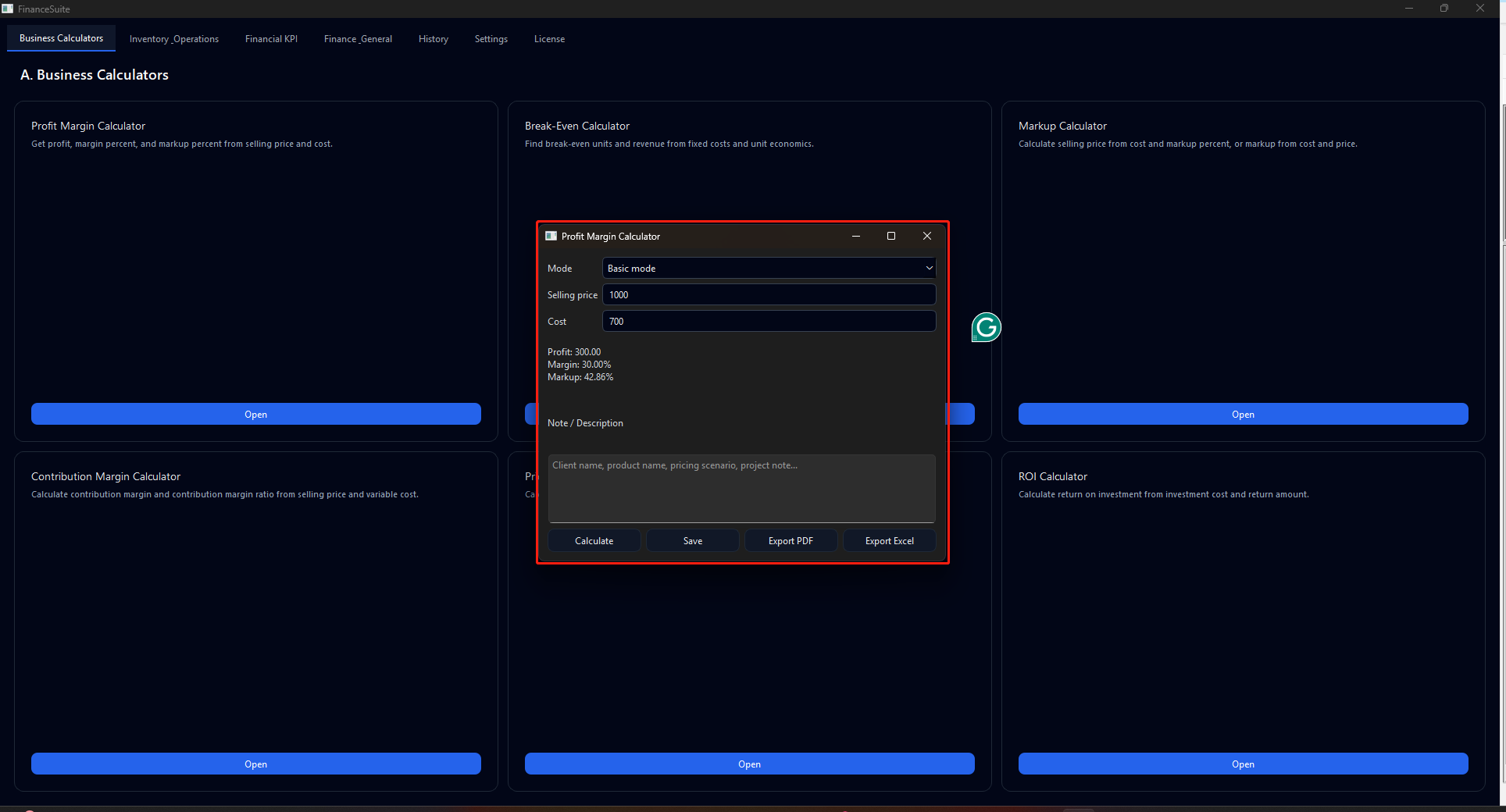
Calculator sections: 24 tools in Business, Inventory, KPI and Finance groups
Practical capabilities
Calculator modules that keep financial math reusable
Real modules from the application — explained as daily business use, not as a feature dump.24 calculators in 4 sections
Business, Inventory & Operations, Financial KPI and Finance & General — e.g. margin, ROI, reorder, VAT, depreciation.SQLite history + notes
Every saved run stores inputs, results, note/description, date and calculator type.Reopen, search & filters
History tab finds prior work by note, calculator or date; reopen and re-export.PDF & Excel export
From active calculator or history record — standardized output for sharing.Advanced modes (selected calculators)
ROI, payback, compound interest, depreciation and reorder point support extended inputs where documented.5 languages, 10 currencies, backup
Settings for language/currency; backup, restore, reset and hardware ID license — fully offline.Compared with Excel
- Excel remains useful for bespoke models. It becomes fragile as the archive of daily business calculations.
- FICO369 keeps 24 calculators, notes and history in one SQLite database the company owns.
- Reopen and export replace rebuilding the same scenario from scratch each week.
Why not stay in spreadsheets?
Where Excel stays useful — and where FICO369 replaces calculation chaos
Spreadsheets help with one-off math, but reusable business calculators with searchable history need one local suite — not orphaned workbooks without context.Implementation
Install, set language/currency, then migrate your repeat calculations
- Install Windows EXE and set language, currency and backup location in Settings.
- Run your most frequent calculators and save with meaningful notes.
- Use History instead of keeping parallel Excel copies.
- Export PDF/Excel when sharing; schedule backup like any operational tool.
See if FICO369 covers the calculations you repeat every week
Compare licenses, download the demo, or contact us with your calculation list.FAQ