
CashFlow & Payments Tracker
CashFlow & Payments Tracker for payment timing and cash visibility
What is due this week? What is already late? What does the next 30 days look like? CFT is for payment timing — the gap Excel lists usually leave open until cash is tight.
7/30/90 projectionsPartnersLight/darkBackup
Why this software exists
Cash pressure arrives early when due and late payments stay invisible
Cash lists can show amounts and still hide timing. The real question is what is due, what is late, and what the next weeks look like before choices disappear. CFT exists for income/expense/planned/paid/late tracking, partners, categories, dashboard projections for 7/30/90 days, five languages, ten currencies, backup, light/dark themes and hardware-locked license.Typical control gaps
- Due payments are discovered too late.
- Planned vs paid status is scattered across bank apps and notes.
- No short-term projection for 7, 30 or 90 days.
- Partner-linked history is incomplete.
- Owners get clarity only after weekend spreadsheet reconstruction.
Typical users
Who reviews due, paid and late before the week closes
Owners and finance operators who need due/late visibility and projections between formal reports.Business ownersFinance operatorsControllersOffice managersSmall finance teams
Business owners
Need early warning on cash pressure from dashboard and 7/30/90-day projections.Finance operators
Track income, expenses, planned and paid items with partner and category context.Controllers
Want practical cash picture between formal accounting closes.Office managers
Follow payment obligations without full ERP.Small finance teams
Need payment discipline, multi-currency view and export without heavy systems.Typical workflow
Enter payment → track due date → mark paid → read projection
Record, classify, project — then export and backup while choices are still open.Income & expense entry↓Partners & categories↓Planned / paid / late↓Dashboard projections↓7 / 30 / 90 days↓Export & backup
Daily use
A finance day that starts with due and late, not month-end surprise
CFT keeps planned, paid and late items visible with partner and category filters. Dashboard projections for 7, 30 and 90 days support decisions before shortfalls become emergencies.Business results
What improves when 7/30/90-day projections sit next to real payments
Earlier warnings
Late and due-soon items surface on dashboard in time to act.Projection clarity
7/30/90-day views support short-term liquidity decisions.Partner-linked history
Income and expense tied to partners for cleaner review.Less spreadsheet reconstruction
Daily tracking replaces weekend cleanup.Product screens
Screens from balance, due lists and cash projections
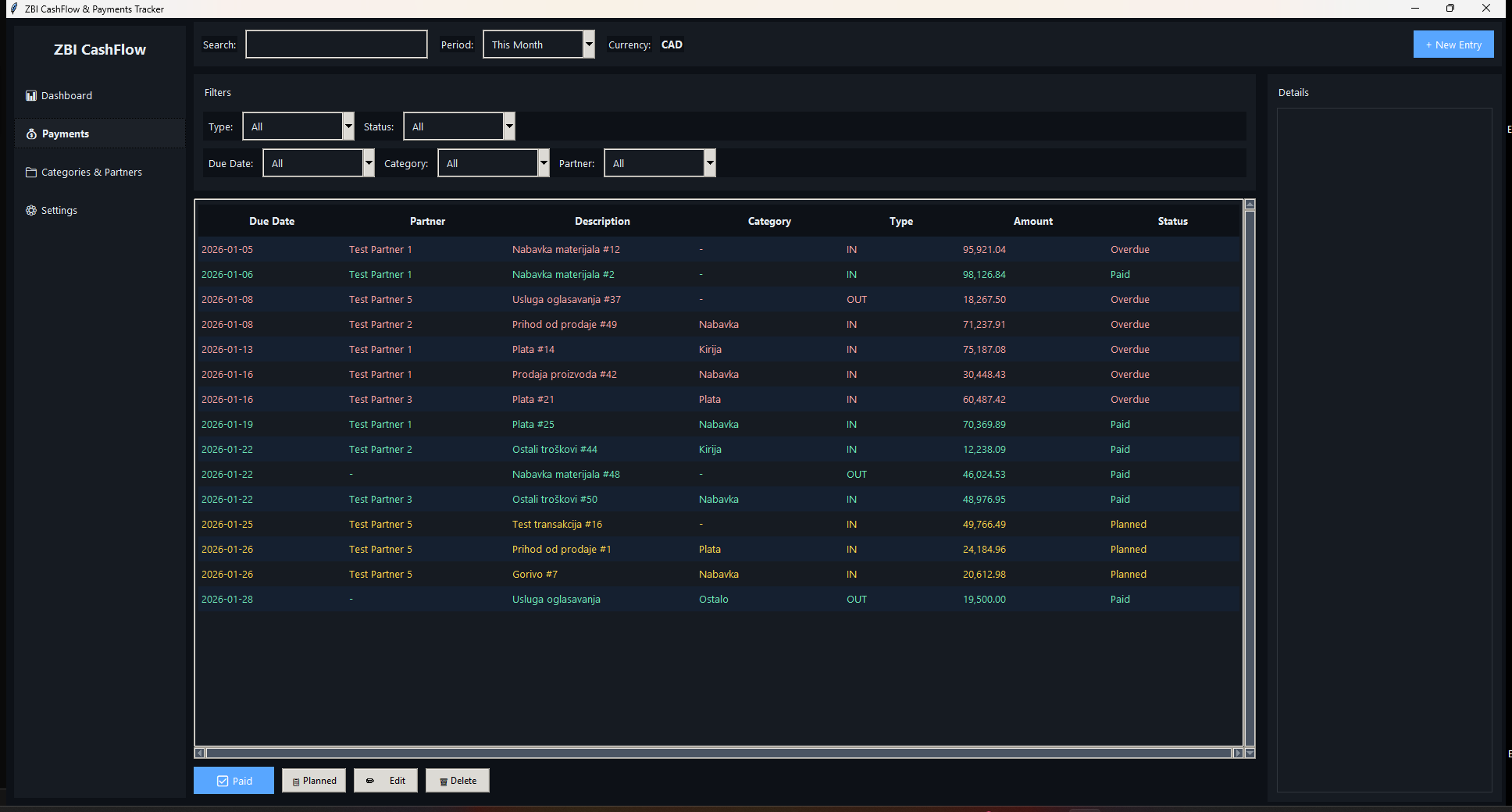
Dashboard and payments first; themes and settings as supporting views.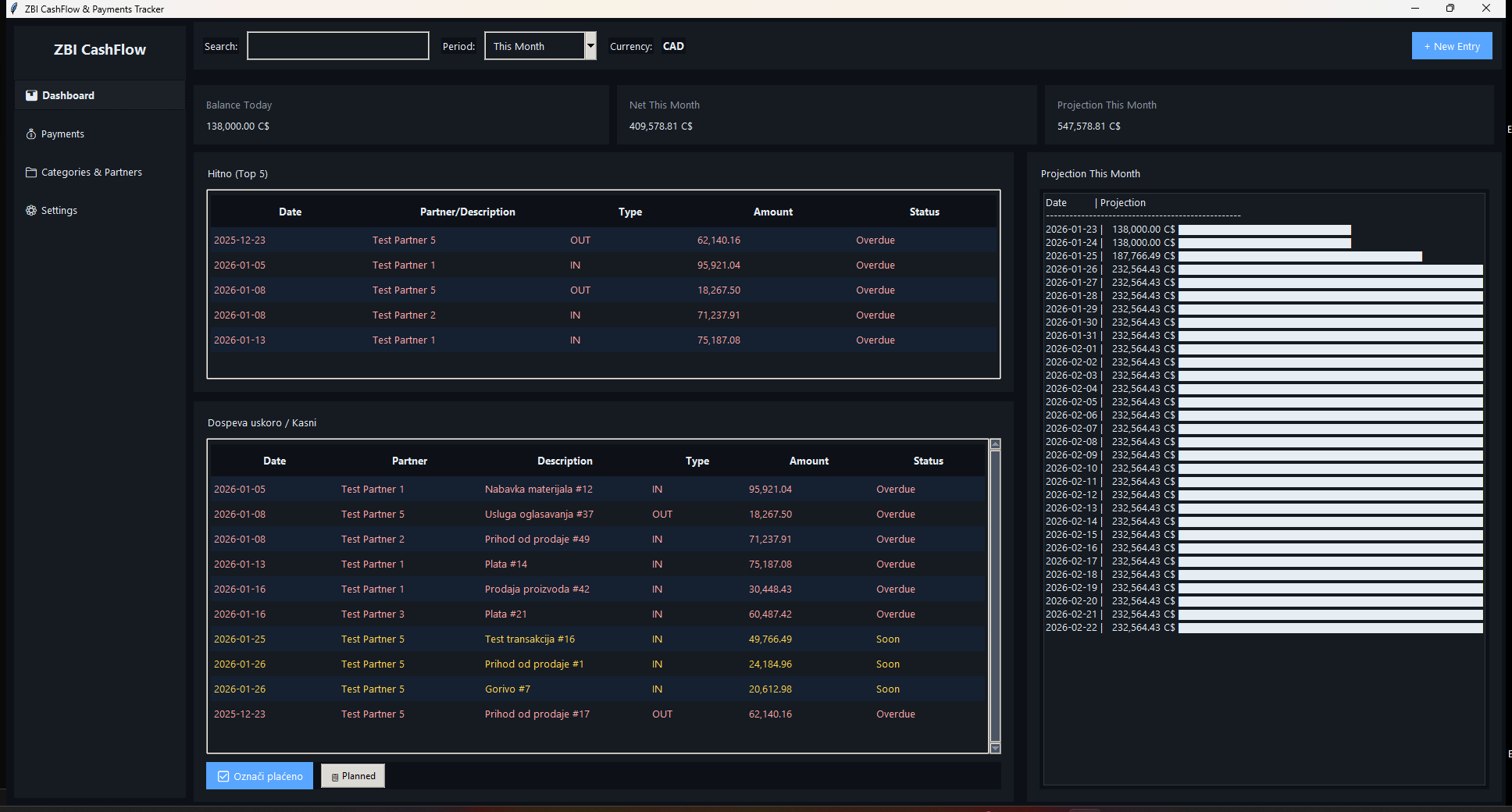


Dashboard: balance and 7/30/90-day cash projections
Practical capabilities
Cash modules that make payment timing visible early
Real modules from the application — explained as daily business use, not as a feature dump.Balance & payments
Track planned and executed income/expense payments against current cash position.Due, paid and late
Payment status that makes late and due items visible before week close.Top urgent payments
Dashboard highlights the most urgent due-soon payments for owner review.7 / 30 / 90 projections
Short-horizon cash projections next to real payment timing — not only month-end totals.Partners
Customers and suppliers linked to payment records instead of opaque cell notes.Categories
Transaction categories for clearer cash analysis and filtering.CSV/Excel export
Export payment data for deeper analysis when needed.Themes, languages & license
Local Windows desktop with language/theme options and hardware-locked license.Compared with Excel
- Excel can hold amounts; CFT focuses on planned/paid/late timing and 7/30/90 projections.
- Partner and category structure reduces opaque cell notes.
- Owners get a practical cash control loop without waiting for accounting close.
Why not stay in spreadsheets?
Why CFT is stronger than Excel cash lists for timing
Excel can hold amounts, but due, late and 7/30/90 cash timing need a payment control loop — not a balance sheet rebuilt at month-end.Implementation
Start with payments that already create stress
- Enter known payables and receivables with due dates and partners.
- Mark planned vs paid as bank movements happen.
- Review dashboard and 7/30/90 projections each morning.
- Export weekly for owner review; backup on schedule.
Test CFT with the payments that already create stress
Compare Annual/Lifetime options or discuss your current payable/receivable timing.FAQ